
Use case · Product configurator
The workstation quote that stopped waiting for engineering
A custom workstation used to mean a sales sketch, an engineering queue, and a SolidWorks re-model. Now sales configures it in 3D in the browser, and that same configuration becomes the model, the drawings, and the BOM.
The situation
Every workstation was designed twice
No two customers order the same workstation. Frame size, load rating, accessories: every quote was different, and every quote needed an engineer. Sales sketched what the customer wanted; engineering rebuilt it in SolidWorks to find out if it could exist. Days passed between inquiry and answer, and the same design was created twice: once as a promise, once as CAD.
What made it hard
Five things a generic configurator couldn't do
Non-CAD users
The people configuring workstations are salespeople. The tool had to feel like a product page, not a CAD seat.
Physics, not preferences
Size, load, and compatibility limits are engineering constraints. An invalid pick had to be impossible, not merely discouraged.
Real space
Accessories mount on physical rails. Two brackets cannot share a slot; the configurator had to catch collisions in 3D.
Production truth
A sales configuration had to come out the other end as a SolidWorks model a shop can build from, not a wishlist.
Enterprise walls
Access had to run through the company's existing Azure Active Directory. No side logins, no shadow accounts.
What FDES built
One platform, two front doors
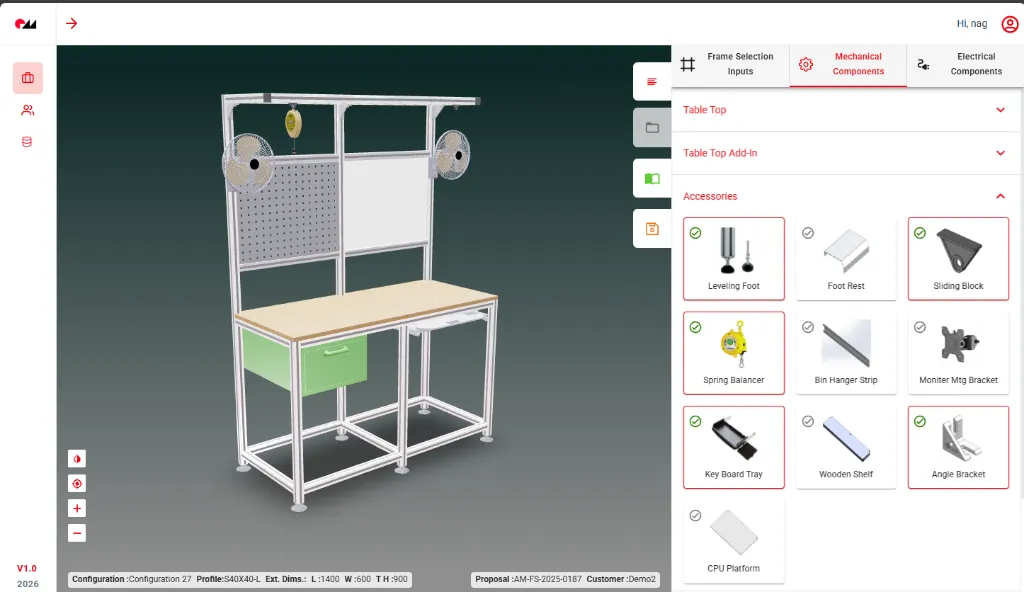
A web configurator for sales. A SolidWorks plugin for engineering. Both read the same rule-validated configuration, so nothing is translated, and nothing is lost.
- Sign in with the company directory. Azure Active Directory handles identity; roles decide who configures, who quotes, who releases.
- Build the workstation step by step. Profiles, dimensions, accessories: chosen in a guided flow, rendered live in 3D.
- Break a rule, see it instantly. Size, load, and fitment checks run on every selection, before a mistake can be saved.
- Watch the model push back. An accessory that doesn't fit shows it in the 3D view: no silent failures, no fine print.
- Hand off nothing. The finished configuration is the engineering input. No export, no re-entry, no interpretation.
Scope
What the platform took over
- 3D workstation configuration, entirely in the browser
- Live fitment and rule validation on every selection
- 3D PDFs with isometric, front, side, and top views
- Excel BOMs and profile cut lists for each configuration
- SolidWorks 3D models and drawings, generated via the API
- Sync between web proposals and engineering systems
Engineering side
The SolidWorks plugin: sales output as design input
Engineering got its own tool: a plugin that pulls configurations into SolidWorks and treats them as finished design intent, not a sketch to redo.
- Pull the proposal straight from the web platform into SolidWorks.
- Review the configured design in the native engineering environment.
- Generate the outputs in one pass: 3D model, 2D drawings, BOM.
- Skip the re-modeling. What sales configured is exactly what engineering receives.
Measured in production
What changed, measured
Per configuration
A workstation variant that took 2–3 days now configures in under 30 minutes.
Re-modeling gone
100% of manual CAD recreation eliminated; SolidWorks models generate straight from configurator selections.
Invalid orders
Zero invalid configurations have reached production. The rules stop them at the point of sale.
Throughput
3x the order volume, handled without adding a single engineer.
Beyond the numbers
What changed after deployment
The numbers above landed within weeks. The structural changes took a little longer to surface, and matter more.
Sales stopped queuing
Before, every custom quote joined a line behind engineering. A rep couldn't answer a customer until an engineer had checked dimensions, verified accessory fit, and sketched a layout, sometimes days later. Now the rules live in the configurator, and every selection is validated as it's made. Sales builds, checks, and sends proposals on its own schedule. The queue no longer exists.
Growth stopped meaning hiring
Throughput used to scale with engineering headcount: more orders meant more engineers, or longer lead times. The configurator broke that link. The same team now supports three times the order volume, because routine configuration work never touches an engineer's desk. It flows from sales selection to production-ready output on its own.
Engineers went back to engineering
The quiet win: what the engineers do now. Freed from recreating sales sketches in SolidWorks, they design new workstation profiles, improve structural performance, and extend the accessory line. The system handles the work that follows rules. The engineers handle the work that requires judgment.
The quote happens in the meeting
The old cycle (sales gathers requirements, engineering sketches, customer requests changes, engineering revises) collapsed into one conversation. A rep can now configure the workstation with the customer in the room, rotate the 3D model, swap an accessory, resize a frame, and hand over a complete proposal with drawings and pricing before the meeting ends. That speed shows up directly in win rates.
One rulebook for everyone
When each rep configured by hand, each rep carried private rules of thumb, and occasionally quoted something that couldn't be built. Now every proposal passes through the same engineering rules and the same validated components. The output quality no longer depends on who built the quote.
Design decisions
Why this approach worked
Configurator projects fail in predictable ways. Five decisions kept this one from joining them.
The configuration is the CAD
Most configurators stop at a specification document, which someone still has to turn into CAD by hand. This one doesn't. Through the SolidWorks API, the configuration generates the actual model: assemblies, part files, production drawings. There is no translation step, so there is nowhere for information to get lost.
3D in the browser, nothing to install
The preview renders in the browser with React Three Fiber: no desktop software, no plugins, no waiting on server-rendered images. A customer who can rotate the model and inspect it from every angle knows exactly what they're buying. The gap between what was described and what gets delivered (the classic source of disputes) closes before the order is placed.
The same data feeds the shop floor
Every configuration also produces its Bill of Materials and profile cut list, automatically. What sales promises and what manufacturing builds come from one dataset. Nobody re-keys a BOM, nobody interprets sales notes, and the wrong material never gets ordered because of a transcription slip.
Engineering rules, not commerce rules
Off-the-shelf configurators enforce shop logic: option A requires option B. This product needed physics: load capacities, dimensional limits, collision detection between accessories, structural compatibility between profiles. FDES built the validation engine around those constraints from the start. That is why zero invalid configurations have reached production: every output is not just sellable but buildable.
Two interfaces, one truth
Sales needs speed; engineering needs precision. Forcing both into one interface would have served neither. Instead: a guided web flow for sales, a native SolidWorks plugin for engineering, and a single validated configuration underneath. Each team works in its own environment on the same data.
Compare
One custom order, before and after
- 2–3 days from inquiry to configured quote
- A senior engineer in the loop on every order
- Rules of thumb that varied by sales rep
- Pricing errors surfacing on complex builds
- Under 30 minutes per configuration
- Sales runs the whole flow, guided and validated
- One rule engine, 100% consistent output
- Price, BOM, and drawings from the same data
Stack
Built with
Related
More systems like this one
Free · no obligation
Do your quotes still wait on the engineering queue?
If every configurable order costs you engineering hours, a configurator that outputs real CAD can take that queue away. Tell us what you build; we'll tell you what automates.
- An automation engineer walks your configuration-to-CAD workflow
- Product families ranked by configurator payoff
- Engineering hours and error costs put into numbers
- A pilot-first roadmap for your product line