
Our process · discovery to deployment
What Happens After
You Say Yes
Five stages. Each one ends with something you can hold (a document, a spec, a running prototype) and a decision point where you choose to continue. You see the automation work on your own parts before you commit to full development.
Discovery → Strategy → Prototype → Production → Rollout
Our process
Five Stages, a Checkpoint at Each
Say you signed yesterday. Here's what we'd ask you for, what you'd get back at each stage, and where you could stop if the numbers didn't convince you.
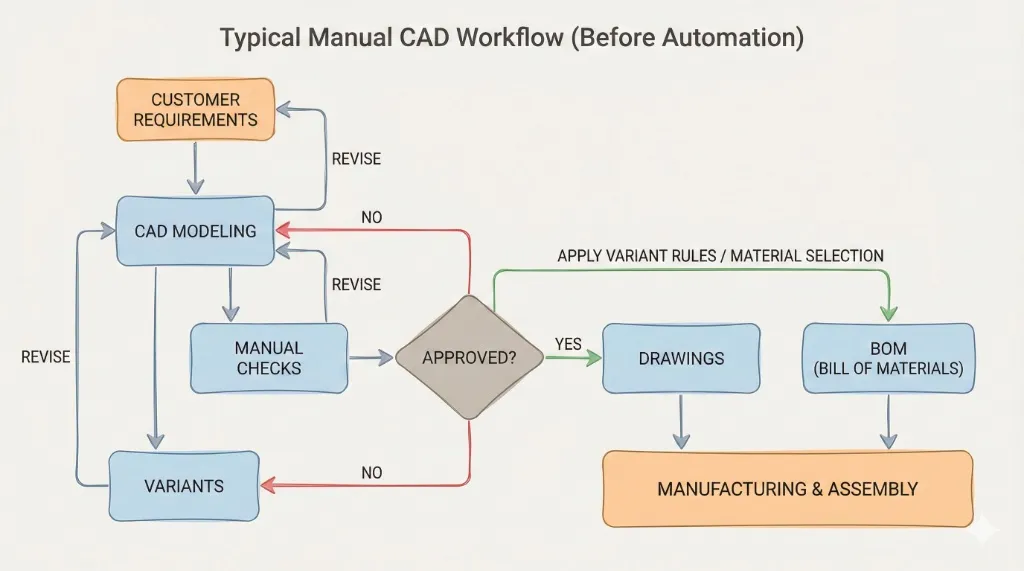
We Watch How the Work Actually Gets Done
First we ask for three things: sample drawings from recent orders, the spreadsheet your team quietly relies on, and an hour with the engineer who handles the awkward jobs. No servers, no installs yet. We're mapping where the hours go and where the mistakes hide.
What we do
- Trace a real order from enquiry to released drawings
- Time the repetitive steps and flag the error-prone ones
- Ask about the exceptions: the orders that break the pattern
- Write down the inputs, outputs, and decisions in between
- Put a number on what automation would actually save you
Deliverable
- A written map of your workflow, with estimated hours saved per candidate.
- Scope in writing: what gets automated, what deliberately stays manual.
Your Rules, Written Down and Signed Off
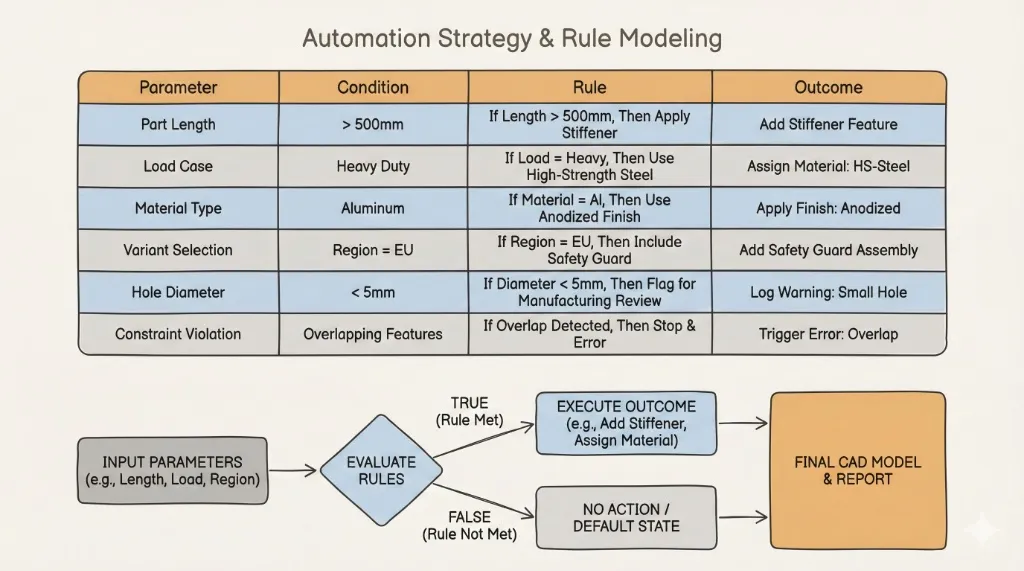
Before anyone writes code, we turn what we learned into explicit rules: if the span exceeds X, do Y; below Z, switch profiles. You read them. You correct them. You approve them. Nothing gets automated that your engineers haven't seen on paper first.
What we do
- Draw the line: what's automated, what stays with your engineers
- Turn the decisions in their heads into written, testable rules
- Design the architecture that will carry those rules
- Plan how it connects to your CAD, ERP, or PDM
Deliverable
- A specification you can read without being a programmer: rules, technical approach, timeline.
- Your engineers validate every rule before development starts.
You See It Run on Your Own Parts
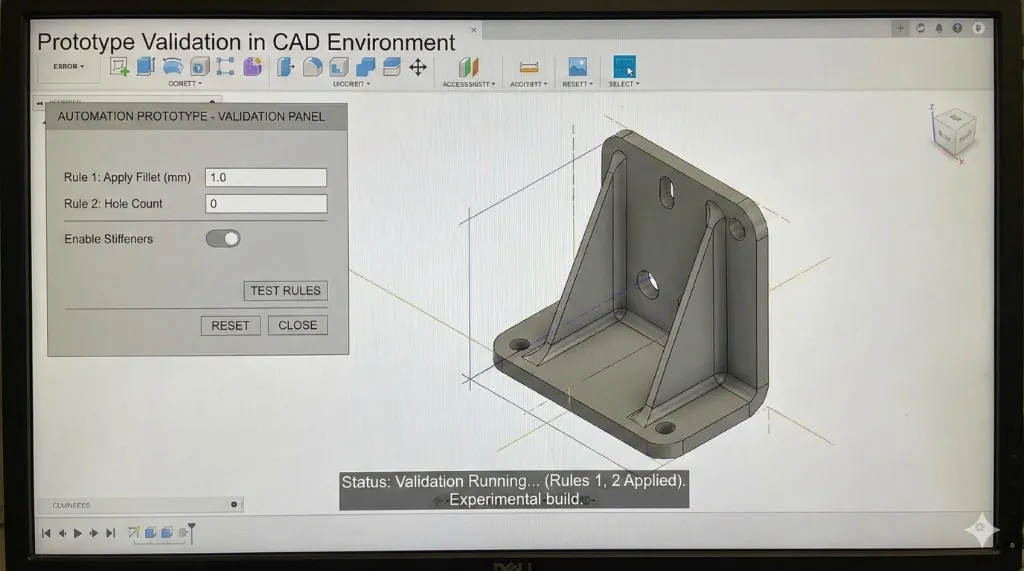
We build a working prototype for one product family and run it against orders you've already shipped. You lay the automated output next to drawings you trust and compare them line by line. If it doesn't convince you, you stop here, and keep the workflow map and rule spec.
What we do
- Build the core automation for one product family
- Run it on configurations you've actually sold
- Compare its output to drawings your team made by hand
- Fix the rules wherever reality disagrees with the spec
Deliverable
- A working prototype covering a slice of your product range: proof, not a slide deck.
Then We Build the Version That Survives Monday Morning
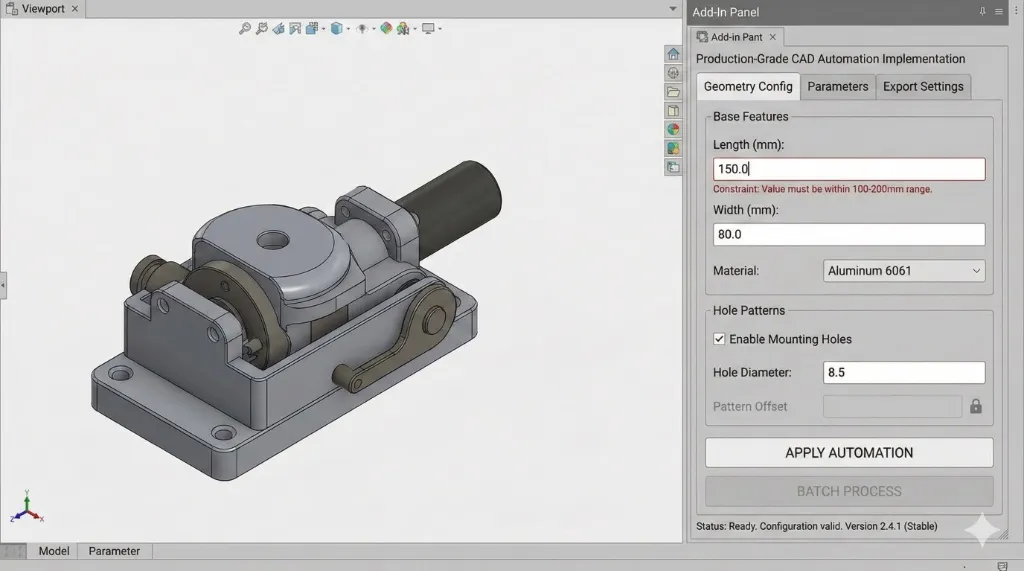
The prototype proved the logic. Now we harden it: every variant, every edge case, error messages a person can act on, an interface your team will actually use. This is the difference between a script that worked once in a demo and software that runs every order without someone babysitting it.
What we do
- Extend coverage to your full variant range
- Handle the bad inputs and the weird orders gracefully
- Build the interface and configuration tools your team drives
- Test against real order history before anything ships
Deliverable
- The full production system, tested and validated against real work.
A Handover You Could Survive Without Us
We deploy, we train your engineers, and we write documentation good enough that a new hire could run the system without calling us. Then we stay available anyway, for maintenance, and for the ideas your team gets once they see what automation can do.
What we do
- Deploy into your production environment
- Write documentation for users and administrators
- Train the engineers who'll run it every day
- Make sure knowledge doesn't leave when people do
- Stay on for support and improvements
Deliverable
- A trained team, complete documentation, and a support agreement. The system is yours, not a dependency on us.
Timeline
Kickoff to Production: 13–26 Weeks
The stages overlap, so the calendar runs shorter than the sum of the steps. Here's how a typical project actually lands.
We map your workflow and write the rules down. You approve the spec before code exists.
You watch the automation run on orders you've already shipped, and decide whether to continue.
The prototype becomes hardened software: full variant coverage, error handling, interface, testing.
Your team is trained, the documentation is done, and the system runs your orders. We stay on support.
Your product's complexity sets the real dates. You get a firm estimate at the end of discovery, not before, because guessing wouldn't help you.
Flexibility
Three Ways to Run It
Pick the shape that matches your risk appetite. All three follow the same five stages.
Phased Implementation
Automate the workflow that hurts most, bank the result, then decide what's next. Each phase funds the case for the one after it. How most clients start.
Fixed-Scope Projects
One defined problem, one price, one deadline. Right when you already know exactly what needs automating.
Long-Term Partnership
A standing team that keeps extending your automation as your products, standards, and CAD versions change.
Free · no obligation
The First Step Costs You an Hour, Not a Contract
Bring us one painful workflow. An automation engineer looks at it and tells you what's worth automating, what isn't, and roughly what you'd save. If the honest answer is "don't automate this," that's what you'll hear.
- An automation engineer reviews your CAD and Excel workflows
- The workflows worth automating, ranked by payback
- Hours and errors you'd claw back, quantified
- A roadmap you keep whether or not you hire us