
Industry · Architecture, Engineering & BIM
BIM automation for architecture & engineering teams
Version 12 of the model just landed, and nobody can say what changed since version 11. So a modeler opens both files and starts comparing, view by view. Add family creation, sheet setup, and schedule extraction, and the week is gone before design work starts. We build Revit add-ins and comparison tools that do all of it in minutes.
The challenge
Where BIM Projects Lose Modeler-Weeks
Three drains, identical on every project. Each one follows rules, which is exactly why each one automates cleanly.
Diffing models by eye
Dozens of revisions per project, and the only change log is human memory. A moved wall gets caught in review. A rerouted duct surfaces at coordination, or on site.
Clicks that never change
Family creation, parameter pushes, sheet setup, schedule generation. The steps are the same on project forty as on project one, and a modeler still runs them by hand.
Data trapped in the model
The quantities, schedules, and specs already exist in Revit. Getting them out means manual extraction and reformatting, repeated for every deliverable, every revision.
Our solutions
BIM Automation We Build for AEC Firms
Custom Revit Add-ins
The tasks your modelers repeat all day become ribbon buttons (batch family edits, parameter updates, sheet packs, schedules) built on the Revit API, living inside Revit.
Learn more → TWO MODEL VERSIONS IN → VISUAL DIFF OUTBIM Model Comparison
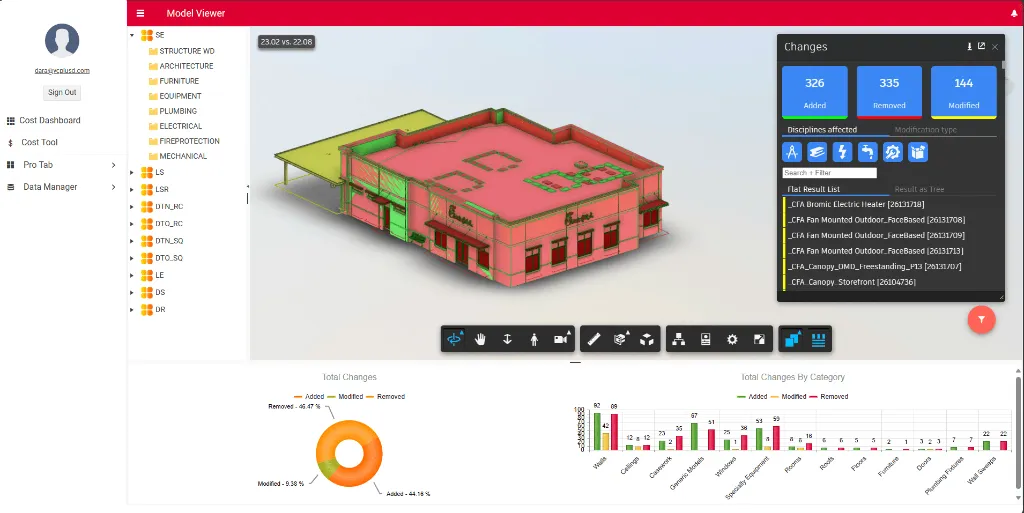
Point the tool at two versions of a model and get every added, modified, and deleted element highlighted: a visual change report in minutes, not an afternoon of eyeballing.
Learn more → REVIT MODEL IN → BROWSER VIEWER OUTCloud BIM Viewers
Clients and consultants open the model in any browser (pan, section, query) with zero Revit licenses and zero "can you export me a view" emails. Built on Autodesk Platform Services.
Learn more → BIM DATA IN → TAKEOFFS · REPORTS OUTAutomated Documentation
Quantity takeoffs, spec documents, and compliance reports generated straight from model data, in your templates, regenerated on demand when the model changes.
Learn more →Go deeper on the platform behind these tools: Revit & BIM automation (API add-ins, Dynamo, and Autodesk Platform Services), and see our BIM model version-change intelligence platform in production.
Results
What AEC Firms Measure After Go-Live
"Nag is excellent to work with. They figured out a difficult API that 3 other developers couldn't figure out and delivered 2 days ahead of schedule."
ANDY ARLEDGE, PRESIDENT, APPRAISER GENIE
Free · no obligation
Find out what your BIM workflow can hand off
Bring us your Revit routine: the version tracking, the sheet setup, the extraction work. In a free audit, we map which pieces automate cleanly and what each returns in modeler-hours per week.
- An automation engineer walks your Revit and model-management workflow
- Version-tracking and coordination pain points made explicit
- Documentation tasks ranked by hours returned
- A plugin-and-automation roadmap you can act on