
Use case · Drawing automation
Railway signaling layouts, generated from data instead of drafted by hand
A signaling layout is a safety document. Kernex Microsystems drafted each one manually: 3–5 days per station, dozens of stations per project. FDES built the AutoCAD plug-in that now draws them from structured data in 2–4 hours, validated before release.
The situation
Drafting had become the project schedule
Kernex Microsystems builds railway safety systems, and every deployment needs signaling layout drawings: tracks, turnouts, block sections, signals, and the tags that identify each element. Drafters built each station layout by hand in AutoCAD, symbol by symbol, from engineering tables. One layout took 3–5 days. A project spans 50+ stations. The math made drafting the pacing item of every project, and every manually placed symbol was one more chance for a safety-relevant mistake.
What made it hard
Why "just script it" was never going to be enough
No tolerance for error
These drawings direct train movements. A misplaced signal symbol isn't a typo; it's a defect that cannot be allowed to exist.
Interlocking geometry
Tracks, turnouts, and block sections connect. Move one element and its neighbors, tags, and annotations all have to follow.
The truth lived in tables
The engineering data already existed, structured and correct. The drawing had to be a faithful projection of that data, not a hand-made copy of it.
Corridor scale
One project means dozens of stations and multiple interlinked drawings, all generated from a shared dataset without drifting apart.
Standards, exactly
Symbols, scaling, and annotation follow railway signaling conventions. Every sheet had to comply: automatically, not by review.
What FDES built
An AutoCAD plug-in that turns tables into layouts
FDES built the automation around how Kernex's engineers already worked: signaling data goes into structured templates, and the drawings come out: placed, tagged, and scaled to standard.
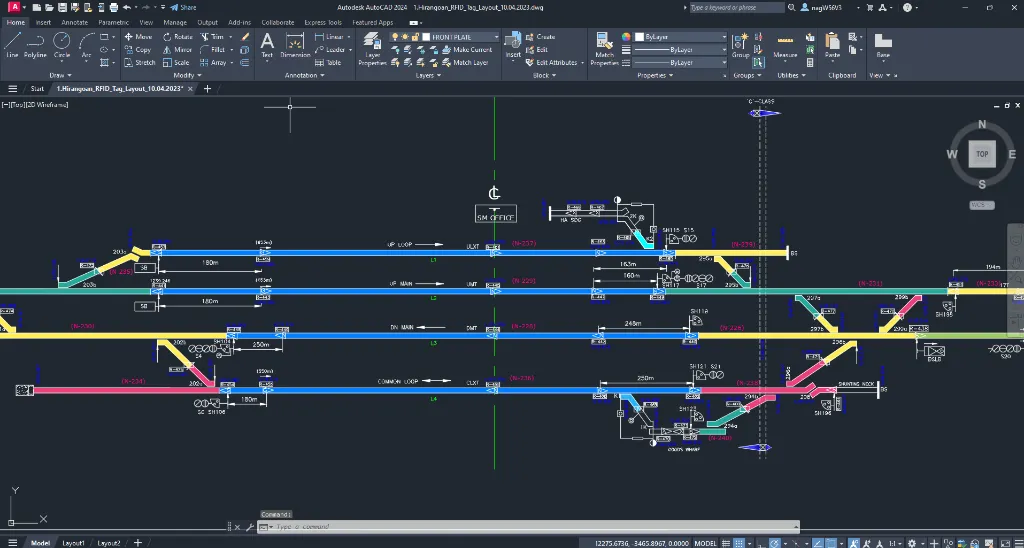
- Excel is the interface. Engineers fill structured templates, the same tables they were already maintaining.
- The plug-in parses the data inside AutoCAD and turns rows into geometry.
- Tracks, turnouts, blocks, and tags draw themselves, placed and scaled to signaling conventions.
- Custom commands keep the engineer in control: generate, validate, regenerate. One station or a whole corridor.
- One dataset drives many drawings. Interconnected station layouts generate from a single source of truth.
Scope
What the plug-in took over
- Track layout generation, straight from the dataset
- Turnouts, block sections, and signaling components
- Tags, labels, and annotations at correct scale
- Parsing of structured Excel input inside AutoCAD
- Multi-drawing generation across interconnected stations
- Validation before any layout reaches a released sheet
Measured in production
What changed, measured
Per layout
A signaling layout that took 3–5 days of drafting now generates in 2–4 hours.
Safety errors
Zero safety-critical drafting errors; automated validation checks every layout against railway signaling standards.
One standard
100% consistent deliverables across 50+ station layouts within the same project.
Team size
A 4-person team now delivers drawing volumes that previously needed 12+ engineers.
Compare
One station layout, both ways
- 3–5 days of drafting per signaling layout
- Every signal symbol placed and checked by hand
- Revision loops whenever a sheet drifted from the data
- The method lived in one senior drafter's head
- 2–4 hours per complete layout
- Symbols placed by rule tables, scaled to standard
- First-time-right sheets, zero revision loops
- The logic captured in a system anyone can run
Stack
Built with
Related
More systems like this one
Free · no obligation
Drawings that have to be right every single time?
If your drawings are projections of structured data, and an error is unacceptable, they can be generated instead of drafted. Tell us about your workflow.
- An automation engineer walks your current drawing workflow
- Drawing families ranked by automation payoff
- Drafting hours and error risk put into numbers
- A pilot-first roadmap for your projects