
Use case · CAD Customization & Add-ins
Steel Profile Tool Mapping Automation in AutoCAD
A profile drawing holds everything the punching machine needs: hole positions, features, lengths. Getting it out took an engineer 45 minutes per profile. We built an AutoCAD plug-in that reads the drawing and writes the machine-ready part description itself.
The challenge
The drawing had the answers. The machine couldn't read them.
Before any steel got punched, someone had to translate: read the profile drawing by eye, work out lengths and reference origins, look up which tool produces each hole, and type it all into a part description the machine would accept. Every profile meant interpretation. Interpretations varied by person, and the wrong ones surfaced mid-production, as scrap.
What made it hard
Five things the plug-in had to get right
The solution
Manufacturing logic, living inside AutoCAD
FDES built a production-grade AutoCAD plug-in that reads a profile drawing the way an experienced operator does, then does everything the operator used to do next.
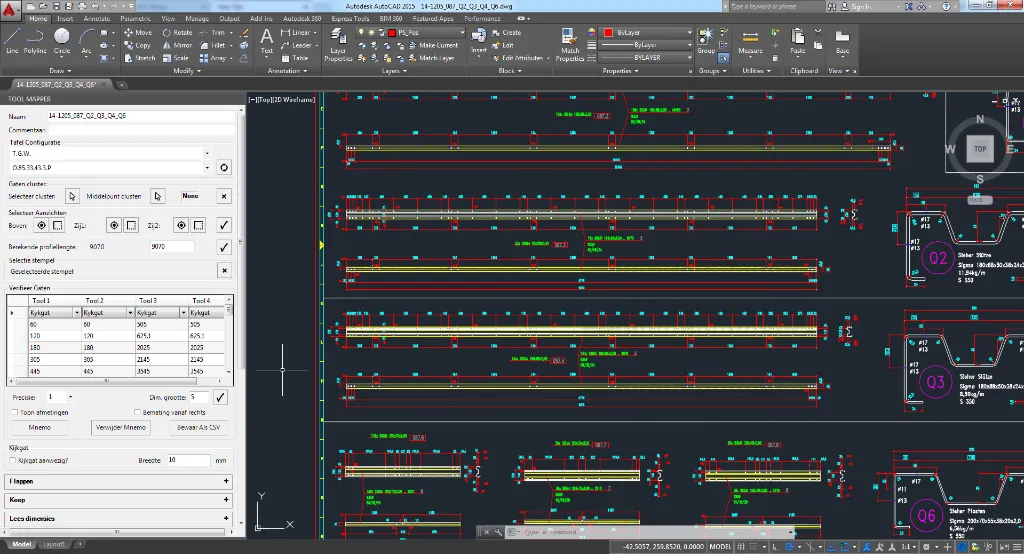
- Reads geometry straight off the drawing through the AutoCAD API: no exports, no tracing.
- Finds holes, slots, and profile features on its own.
- Assigns punching tools from configurable mapping tables: your rules, editable without a developer.
- Writes validated part descriptions the machine software accepts unchanged.
- Lets the operator override: deliberately, and on the record.
Delivered scope
What the plug-in took over
Technologies used
Measured outcome
What changed on the shop floor
Of the mapping, automated
90% of manual tool mapping is gone; a profile that took 45 minutes now takes under 5 minutes.
Faster machine setup
Machine setup time fell by 70%, and setups no longer queue behind senior staff. Junior operators run them.
Right the first time
99.5% accuracy in automated part descriptions. Punching tool selection errors have all but disappeared.
Senior time, back
15+ hours of senior engineer time return every week, spent on process optimization, not transcription.
The difference
One profile, both ways
Related
More systems like this one
Next step
Your drawings already carry manufacturing decisions. Let them run.
If tooling rules, machine constraints, or shop-floor logic live in your CAD workflow, that logic can run as code. Tell us where the hours go; we'll tell you what automates cleanly.
- 90% of manual tool mapping automated
- 45 minutes per profile cut to under 5
- 99.5% accuracy on generated part descriptions
- 15+ senior engineer hours back every week