
Free tool · no account · nothing stored
Steel Pole Fabrication Sanity Check
A pole that passes analysis can still be awkward to build. Read the tube schedule from the PLS-POLE results and test it against your kettle, your cranes, your plate stock and your splice rule before it reaches the shop.
Your limits
These are fabrication and handling sanity checks against the limits you enter, not structural checks. Tube data comes from the Steel Tubes Properties and Pole Steel Properties tables of the XML, shown as PLS-POLE reported them. A value PLS-POLE reports as zero is shown as "not defined" and the related check asks for review rather than passing.
How to export the results XML from PLS-POLE
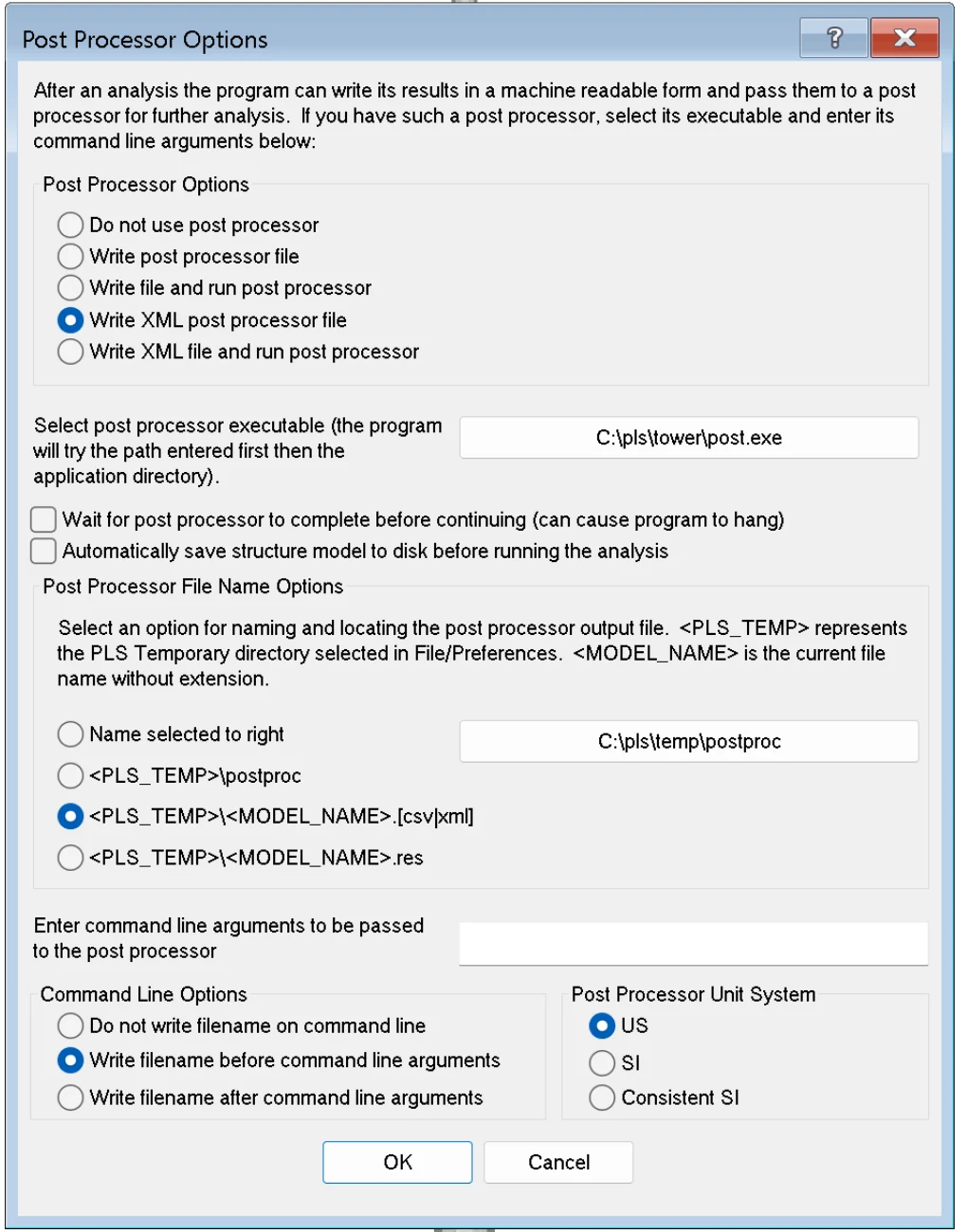
- Open the model in PLS-POLE and go to General > Post Processor Options.
- Select Write XML post processor file. Leave the "run post processor" options unselected.
- Under file name options choose <PLS_TEMP>\<MODEL_NAME>.[csv|xml], or "Name selected to right" with a folder of your own. Keep the unit system you work in; the tools read the units from the file.
- Click OK, then run the analysis with Model > Run. The XML is written when the analysis finishes.
- Find the file. The PLS temporary folder is row 2, Temporary Directory, in File > Preferences, typically
C:\Users\<you>\AppData\Roaming\PLS\temp. The file is named after the model, for examplespoex5.xml. - Check the file size before uploading. A zero-byte file means the analysis did not complete, or the option was changed after the run.
- The XML holds results only. Re-run the analysis after every model change and upload the fresh file.
- For the cross-file checks keep the
.pol,.sppand.lcathat belong to that run together with the XML.
Full guide with the Preferences screen, the library location and how to save a load file: Export results XML from PLS-POLE.
Shop-ready from the analysis
Manufacturable Pole? Now Get the Shop Drawings Without Drafting.
FDES automation turns the PLS-POLE tube schedule into the 3D model, seams, splices, base plate detail, fabrication drawings and BOM, to your templates and plate stock. Bring one pole and we will show you the workflow.
- Tube schedule to modelled shaft, seams and splices
- Inventor, AutoCAD, SolidWorks and more
- Your templates, part numbers and standards
- Free automation audit, no commitment