
Free tool · no account · nothing stored
PLS-POLE Foundation Reactions
Every load case's support reactions in one table, with the governing values enveloped, ready to hand to the foundation designer. Values are exactly as PLS-POLE reported them.
Values are taken from the Joint Support Reactions and Overturning Moments tables exactly as PLS-POLE reported them, in the units of the XML. Nothing is recalculated except the resultants shown.
How to export the results XML from PLS-POLE
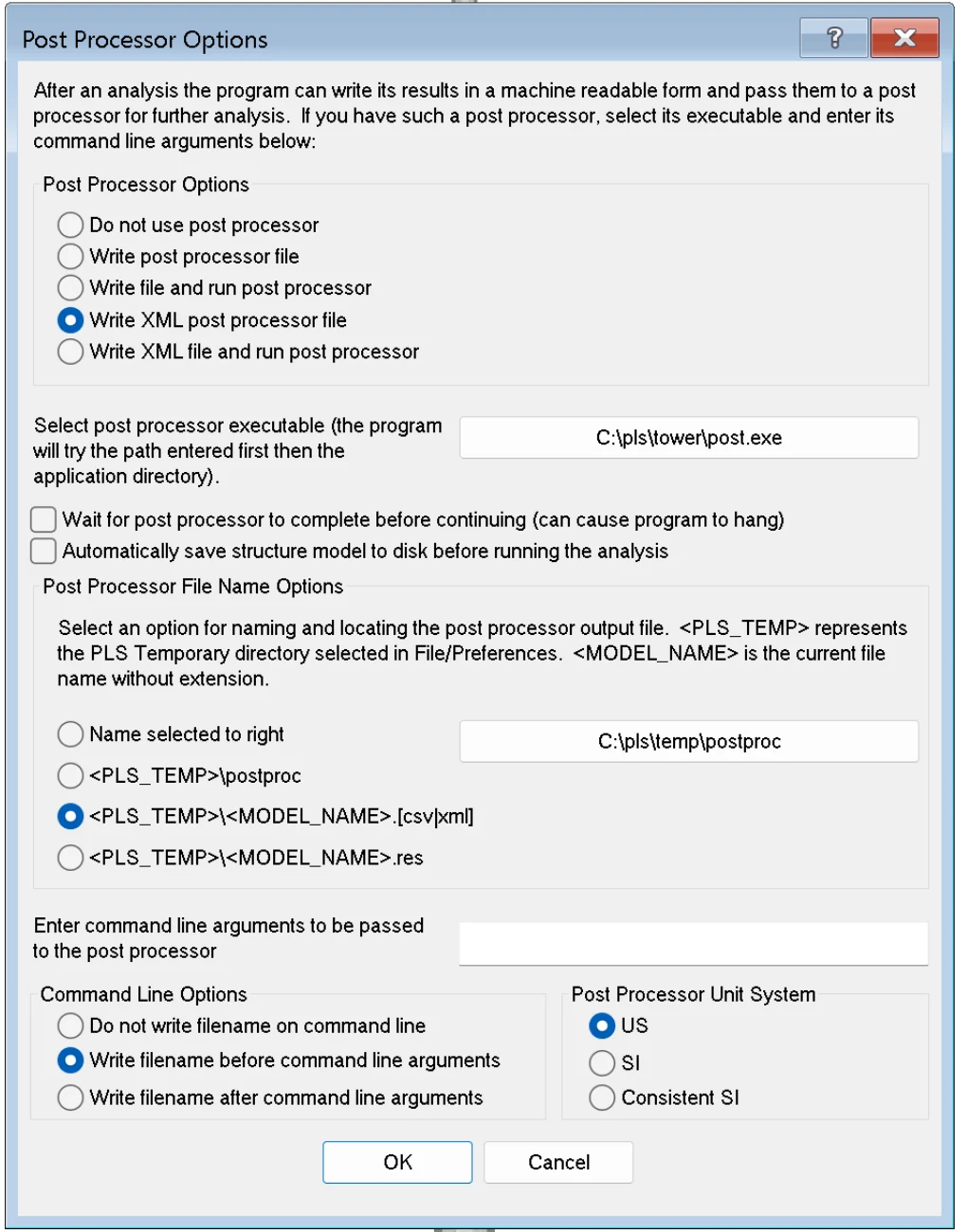
- Open the model in PLS-POLE and go to General > Post Processor Options.
- Select Write XML post processor file. Leave the "run post processor" options unselected.
- Under file name options choose <PLS_TEMP>\<MODEL_NAME>.[csv|xml], or "Name selected to right" with a folder of your own. Keep the unit system you work in; the tools read the units from the file.
- Click OK, then run the analysis with Model > Run. The XML is written when the analysis finishes.
- Find the file. The PLS temporary folder is row 2, Temporary Directory, in File > Preferences, typically
C:\Users\<you>\AppData\Roaming\PLS\temp. The file is named after the model, for examplespoex5.xml. - Check the file size before uploading. A zero-byte file means the analysis did not complete, or the option was changed after the run.
- The XML holds results only. Re-run the analysis after every model change and upload the fresh file.
- For the cross-file checks keep the
.pol,.sppand.lcathat belong to that run together with the XML.
Full guide with the Preferences screen, the library location and how to save a load file: Export results XML from PLS-POLE.
Reactions in, drawings out
The Analysis Is Done. The Drawings Should Follow Automatically.
FDES automation reads the same PLS-POLE XML and produces the shaft drawings, the base plate detail with the bolt pattern, and the BOM to your standards. Bring one pole and we will show you the workflow.
- Shaft, base plate and bolt pattern detailed from the XML
- Inventor, AutoCAD, SolidWorks and more
- Your templates, part numbers and standards
- Free automation audit, no commitment