
Solution · Structured data to signaling layouts
Railway Signaling
Design Automation
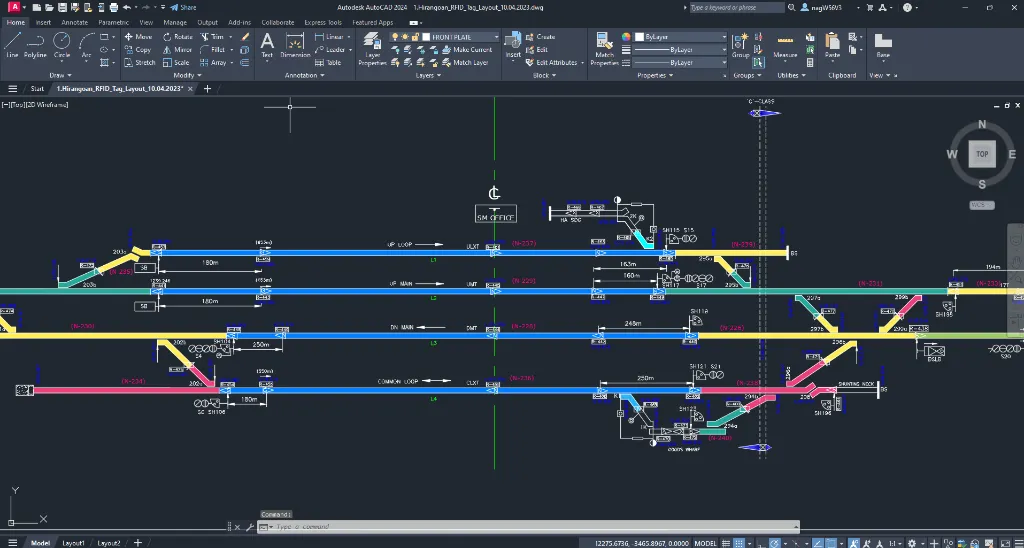
A signaling layout is a safety document, and drafting one by hand takes days per station across dozens of stations per project. We build signaling design automation that generates the layout straight from your engineering data: tracks, turnouts, block sections, signals, and tags, placed and scaled to standard, validated before release.
The problem
The Engineering Is Done. The Drafting Is the Schedule.
The signaling engineering already exists as structured tables: block sections, signal positions, turnout geometry. What follows is slow: a drafter rebuilds each station layout in AutoCAD symbol by symbol, at 3 to 5 days per station, across 50 or more stations in a corridor project.
Days of drafting per station
Every station layout is built by hand from engineering tables. Multiply by the stations in a corridor and drafting becomes the pacing item of the entire project.
Errors that direct trains
These drawings govern train movement. A misplaced signal symbol is not a typo, it is a safety-relevant defect that cannot be allowed to reach a released sheet.
Drift across a corridor
Dozens of interlinked station drawings must stay faithful to one shared dataset. Hand drafting lets sheets drift apart, and reconciling them costs another round of review.
Our solution
Automated Signaling Systems Design, From Table to Layout
We build the automation around how your signaling engineers already work. The data lives in structured templates, and the drawings come out placed, tagged, and scaled to your signaling standard, on the CAD platform your team already runs.
Track Layouts Without the Drafting
Structured signaling data becomes geometry inside AutoCAD: tracks, turnouts, and block sections drawn straight from the rows your engineers already maintain. Change the data and the layout regenerates.
Signals and Tags Placed to Standard
Signal symbols, labels, and annotations are placed and scaled to signaling convention automatically. Every sheet complies by rule, not by review, so nothing depends on a drafter remembering the standard.
A Whole Corridor From One Source
Interlinked station layouts generate from a single dataset, so dozens of drawings stay consistent by construction. No manual reconciliation between sheets that should already agree.
Validation Before Release
Automated checks run every layout against your signaling standards before it reaches a released sheet. Custom commands keep the engineer in control: generate, validate, regenerate, one station or the whole project.
The workflow
From Signaling Data to Released Layouts in Hours
Signaling engineering
Your engineers produce the signaling data exactly as they do today. Nothing changes upstream.
Structured templates
Block sections, signal positions, and turnout geometry go into structured Excel templates, the same tables your team already keeps.
Automated generation
The plug-in parses the data inside AutoCAD and draws the complete layout: tracks, turnouts, signals, and tags, in hours rather than days.
Validate and release
Automated checks confirm the layout against signaling standards. Your engineer reviews, regenerates if needed, and releases.
Corridor scale
Repeat across every station from the shared dataset, with all interlinked sheets staying consistent by construction.
Want the full story of a deployed system, station by station? Read the case study: Railway Signaling Drawing Automation at Kernex Microsystems.
Typical results
What Signaling Teams See in Production
Proven results
Deployed in Railway Safety and Infrastructure
"A signaling layout that took our drafters 3 to 5 days now generates in a few hours, validated before it ever reaches a released sheet. The method no longer lives in one senior drafter's head." Railway Signaling & Safety Systems Manufacturer
- Per-layout time cut from 3 to 5 days down to 2 to 4 hours
- Zero safety-critical drafting errors, checked automatically
- 100% consistent output across 50 or more stations per project
- A 4-person team delivering what previously needed 12+ engineers
Custom built
Built Around Your Signaling Standard, Not a Generic One
Signaling conventions differ by railway, region, and authority. The automation is shaped around the way your team already draws and releases. Every one of these is configured to your practice:
Signal symbols
Your symbol library, block markers, and signal types
Track elements
Turnouts, crossings, block sections, gradients
Annotation standards
Tagging, labelling, and numbering conventions
Scaling and layout
Sheet scale, title blocks, and view arrangement
Input templates
The structured tables your engineers already maintain
Validation rules
The safety checks that must pass before release
How we work
From Audit to Production in 8-16 Weeks
Why FDES
Why FDES Technologies
- 19 years building design automation and CAD customization
- Fluent across platforms, with signaling automation deployed on AutoCAD
- Data-driven drawings generated from the structured tables you already keep
- Validation-first, built for drawings that must be right every time
- Custom engineering, not a generic product that almost fits
- One team, end to end, from workflow audit to production-grade automation
FAQ
Asked on Nearly Every First Call
What is railway signaling design automation?
What data does it work from?
What CAD platform does it run on?
How does it prevent safety-critical errors?
Can it handle a whole corridor of stations?
How long does implementation take?
Do we own the source code?
Can we try it before committing?
Free assessment · no commitment
Drawings That Have to Be Right Every Single Time?
If your signaling layouts are projections of structured data, and an error is unacceptable, they can be generated instead of drafted. Bring us your workflow and we will map what automates cleanly, flag where the risk sits, and show you what a production-grade system would look like for your layouts.
- Your current signaling workflow, mapped end to end
- Automation opportunities, ranked
- Risk and feasibility, assessed honestly
- Projected results, in your numbers