
Use case · Drawing automation
Commercial Kitchen Drawings
on a Four-Hour Clock
Every kitchen Gaylord Industries quotes needs a layout drawing, and every layout used to wait days in a drafting queue. FDES turned that queue into a pipeline: structured order in, finished AutoCAD package out in under 4 hours, with a portal where sales watches it run.
The challenge
A Drafting Queue the Business Had Outgrown
For years, a drawing request at Gaylord followed the same path: a sales rep wrote up the kitchen, a skilled drafter opened AutoCAD, and 3-5 days later a layout came back. That held while volume was modest. As demand grew, the queue stretched, standards drifted between drafters, and engineering spent its week on layouts instead of products.
- Skilled people drafting layouts that differed by dimensions, not by design, order after order.
- Layers, text styles, and dimensioning that shifted depending on who picked up the job.
- Sales reps with no way to check on a request short of phoning engineering.
Constraints & Challenges
No two rooms alike
Commercial kitchens come in every footprint. The system had to lay out non-standard rooms intelligently, not just fill template boxes.
Drawings people build from
These layouts drive manufacturing and installation. A wrong dimension doesn't stay on paper; it becomes rework on site.
Fit the existing workflow
Engineers weren't going to adopt a new software ecosystem. The automation had to slot into how work already moved.
Years of standards to honor
Gaylord's block libraries and drafting standards had to carry straight over: continuity, not a restart.
The solution
Split the Thinking From the Drawing
We separated what to draw from how to draw it. A rule engine decides placement, clearances, and component selection; AutoCAD just executes the result.
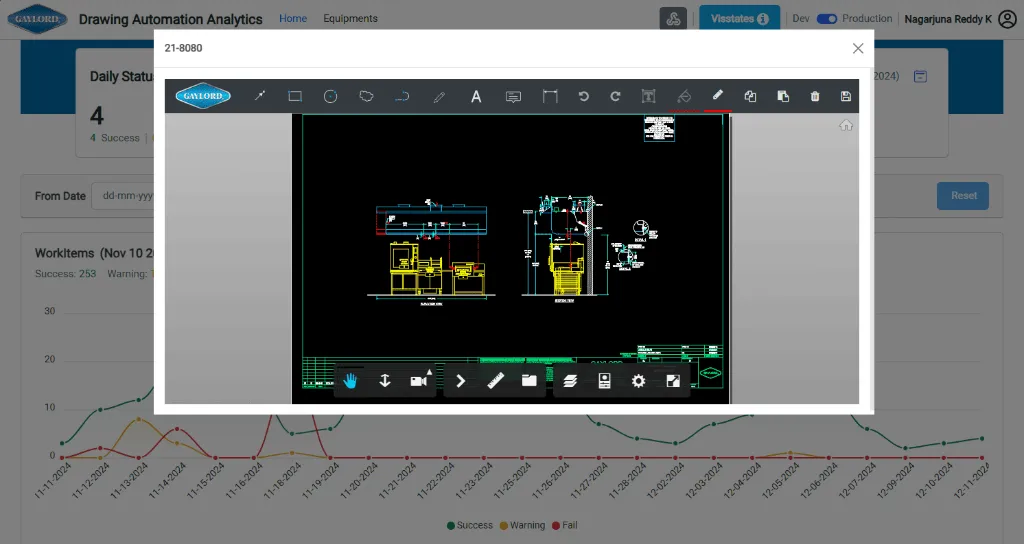
- Requests arrive as structured JSON from the sales and spec team, no more interpreting hand-written notes.
- A rule engine works out the layout: equipment placement, clearances, and component selection, all derived from the input parameters.
- AutoCAD automation draws it: geometry, layer management, and annotations, producing a complete first draft with no one at the keyboard.
- A web portal closes the loop: reps file requests and watch each one move through the pipeline in real time.
Scope
What Was Automated
Measured in production
Impact
Turnaround
A full drawing set in under 4 hours instead of 3-5 days, better than a 90%+ cut in cycle time.
Consistency
100% adherence to layer, text style, and dimstyle standards, at any volume.
Visibility
A live dashboard shows order status, queue depth, and bottleneck alerts; the daily status meeting disappeared.
Peak season
3x seasonal demand spikes absorbed with the same team: no temp drafters, $50K+ saved annually.
After deployment
What Changed After Deployment
Faster drawings were the headline. The real story is what the speed did to everyone around the drafting queue: sales, engineering, operations, and Gaylord's own customers.
Sales stopped hedging on dates
For years the honest promise was "three to five business days", and in busy periods even that was optimistic. Now reps quote same-day drawings and mean it. In a competitive bid, that's often the whole game: while a rival is still scheduling drafting time, Gaylord's layout is already in the prospect's inbox. Reps report the turnaround itself now closes deals, especially with large foodservice chains scoring vendors side by side.
Engineers went back to engineering
The reclaimed hours mattered less than what they were spent on. Routine layout drafting had been soaking up senior engineers' weeks: necessary work, but work a rule engine could do. Once the system took it over, that time flowed into product development, custom engineering, and R&D on next-generation ventilation systems. One engineer had been giving 60% of his week to variant drawings; freed of them, he led a new product line initiative that had sat on hold for over a year. The team stopped being the bottleneck and became the asset again.
Peak season stopped being an emergency
Restaurant build-outs spike in spring and early summer, and Gaylord used to meet the spike two ways: temp drafting contractors (expensive, slow to onboard, uneven in quality) or overtime, which burned the team out and bred errors. The first peak after go-live told the story instead: a threefold increase in drawing requests, processed by the same team at the same quality and the same turnaround. The $50K+ a year saved on temp staffing is just the visible line item; the onboarding time, review overhead, and rework it avoided were likely worth double.
Customers watch the work happen
Dealers and specifiers now see their request move through the pipeline: submitted, in progress, in review, complete. The constant "where's my drawing?" calls that used to eat account managers' days simply stopped. The transparency did something subtler too: watching the process run in real time made it credible. Several key accounts have named the dashboard and the turnaround as reasons they moved order volume to Gaylord from competing suppliers.
Design decisions
Why This Approach Worked
Four decisions, all made before the first line of CAD code, carried this project.
The rule engine came before the CAD code
The tempting first move is scripting AutoCAD: code that draws lines and drops blocks. We built the rule engine first: clearance requirements, equipment compatibility, code compliance checks, placement logic. Gaylord's engineering knowledge, written down once, in one authoritative place. Drawing fast was never the hard part; drawing correctly was. And because the logic lives in the engine rather than scattered across dozens of templates and scripts, a changed standard or a new equipment model is a one-place update, a dividend collected on every revision since.
The whole pipeline, not just the drawing step
Most automation efforts stop at the technical core (here, generating CAD geometry). We automated the full path: intake (structured JSON from sales), processing (rule engine plus drawing generation), output (DWG and PDF export), and visibility (the portal and its notifications). That closed every handoff gap: no step where someone emails a file, renames a document, or updates a spreadsheet, which is exactly where manual processes leak time. For a standard configuration, nothing between request and delivery needs a human. Our estimate: the drawing step alone was maybe 40% of the value. Closing the handoffs was the other 60%.
A dashboard built to run the operation
The portal was never a reporting afterthought; it was designed as an operations tool from day one. Sales managers triage the queue and bump urgent requests on it. Engineering leads read it to see which configurations dominate demand, which now feeds product strategy. Operations spots a forming bottleneck before it costs a day. Making the automation's internal state visible to the people who depend on it is what built trust: nobody had to take the system on faith, because everyone could watch it work.
It was scoped as a system, not a script
The most consequential call was the framing. We mapped the entire journey, from a rep realizing a drawing is needed to a customer holding the file: every handoff, every decision point, every failure mode. That map showed the drafting itself was only part of the 3-5 days. Intake, status-chasing, file management, and quality review made up the rest. Automating the whole system is why the full cycle compressed, instead of one fast step sitting inside a still-slow process.
Compare
Before vs After
- 3–5 days in the queue per drawing package
- Every dimension and note placed by hand, per variant
- Standards that varied with the drafter
- Production idling while it waited on engineering
- Under 4 hours, delivered the same day
- Dimensions and annotations applied by rule
- One standard, enforced on 100% of sheets
- Drawings ready when manufacturing wants them
Stack
Technologies Used
Your workflow next
How Long Is Your Drafting Queue?
Send us the workflow. We'll map which of your drawing families automate cleanly, and what the queue is costing you today in hours and rework.
- The full request-to-delivery path walked, not just the CAD step
- Drawing families ranked by automation payoff
- Current hours and error costs put into numbers
- A pilot-first roadmap from queue to pipeline
Related
Related Use Cases
Railway Signaling Drawing Automation
Signaling layouts: 3–5 days down to 2–4 hours each.
Steel Profile Tool Mapping
Tool mapping per profile: 45 minutes down to under 5.
Screw Conveyor Product Configurator
Conveyor quoting: 4–6 hours down to under 10 minutes.