
Use case · Drawing automation
One retaining wall design in. The whole construction package out.
Every wall Strata Geo Systems designs owes a stack of documents: drawings, layouts, quantities, excavation plans. Assembling that stack took 2–3 days of manual work, and one design change restarted it. FDES automated the entire package.
The situation
The design was fast. The paperwork wasn't.
Strata Geo Systems engineers retaining walls for large civil infrastructure projects. Each design ships with a full construction package: wall drawings, sheet layouts, bills of quantities, excavation plans. Engineers assembled that package by hand: 2–3 days per design, with formatting and quantities varying by who produced it. And civil designs change. Every revised parameter meant reopening every drawing, recounting every quantity, and hoping nothing drifted out of sync.
What made it hard
Five constraints the automation had to honor
Any engineer, one output
Two engineers documenting the same wall had to produce indistinguishable packages, with templates enforced by software, not by habit.
Real wall geometry
Block and panel walls carry rebar, geogrid layers, drainage, and leveling pads. The drawings had to place all of it correctly, not sketch it.
Quantities that add up
The BOQ prices the job. A miscounted block or geogrid roll is real money, so quantities had to come from the geometry itself.
Excavation from design
Cut-and-fill plans had to be derived from the wall design data, not redrawn beside it and reconciled by eye.
Change without penalty
When a design parameter moves, drawings, BOQs, and excavation plans all have to regenerate together, with no manual catch-up.
What FDES built
AutoCAD plugins that treat design data as the single source
FDES built a suite of custom AutoCAD plugins on one principle: the design data is the source of truth, and every document in the package is generated from it.
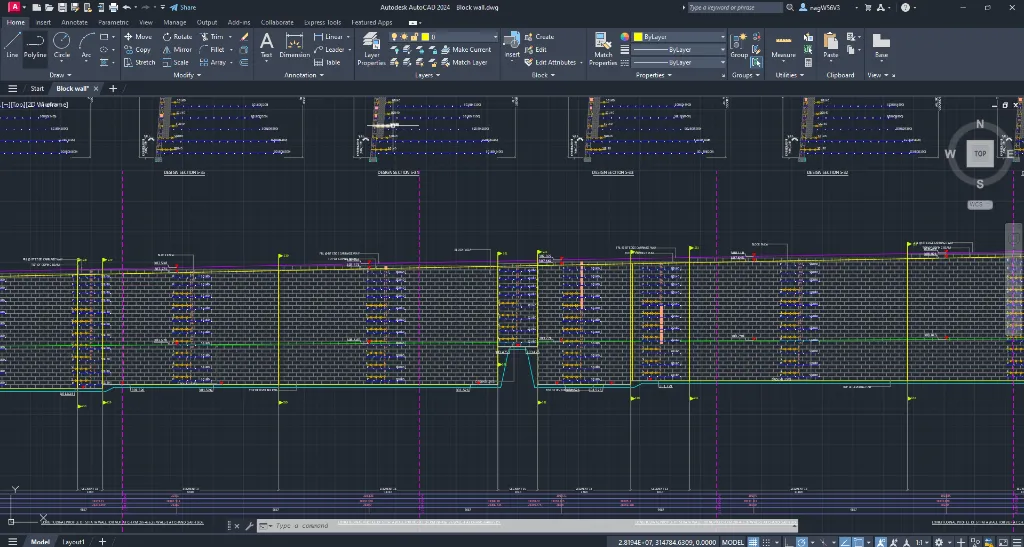
- The wall logic lives in AutoCAD. Strata's design rules are encoded in the plugins, not remembered project by project.
- Structured input drives everything. One dataset feeds the drawings, the layouts, the BOQs, and the excavation plans.
- The package generates as one. Every output comes from the same run, so no document can disagree with another.
- Templates are enforced, not suggested. Every sheet uses Strata's blocks, layers, and layouts automatically.
- A revision is a rerun, not a rebuild. Change a parameter and the full package regenerates.
Scope
What the plugins take over
- Wall drawings for both block and panel systems
- Rebar, geogrid, drainage, and leveling pad placement
- Sheet layout creation and viewport setup
- BOQ generation for concrete, geogrids, and materials
- Excavation drawings with cut-and-fill areas
- Strip charts reflecting wall and layer details
Measured in production
What changed, measured
Per package
Documentation that took 2–3 days now generates in under 4 hours per retaining wall design.
Consistency
100% consistency across all drawing sheets and calculation reports: zero formatting discrepancies.
BOQ errors
BOQ calculation errors eliminated. Quantities take off from the same geometry as the drawings, so they always match.
Ratio inverted
Engineers now spend 80% of their time on design optimization, up from 20%. The old split, inverted.
Compare
One documentation package, both ways
- 2–3 days of manual work per retaining wall calculation set
- Quantities copy-pasted between Excel sheets and documents
- No trail from a changed input to its affected outputs
- Report formatting rebuilt by hand, every time
- Under 4 hours, end to end, automated
- Calculations flow straight into branded reports
- Every output traceable back to its inputs
- Formatting handled by the templates on every run
Stack
Built with
Related
More systems like this one
Free · no obligation
Still assembling construction packages by hand?
If a design revision means redoing drawings, quantities, and plans one by one, the whole package can regenerate from your design data instead. Tell us about your projects.
- An automation engineer walks your documentation workflow
- Drawing and report families ranked by automation payoff
- Rework hours and error costs put into numbers
- A pilot-first roadmap for your projects